• We are STAs
    • Asha Rountree
    • Haley Ma
    • Kate Shih
    • Kyra Lee
    • Nicholas Peasley
    • Sasha Kenney
    • Shanda Horm
    • Shriya Atreya
    • Tomas Marulanda-Mesa
  • We were STAs
  • STA Presentation
    • STA Presentation 2017
    • STA Presentation 2016
  • Testimonials
  • Resources
  • Home

STA Blog

Cristina Villarreal Núñez

Cristina Villarreal Núñez

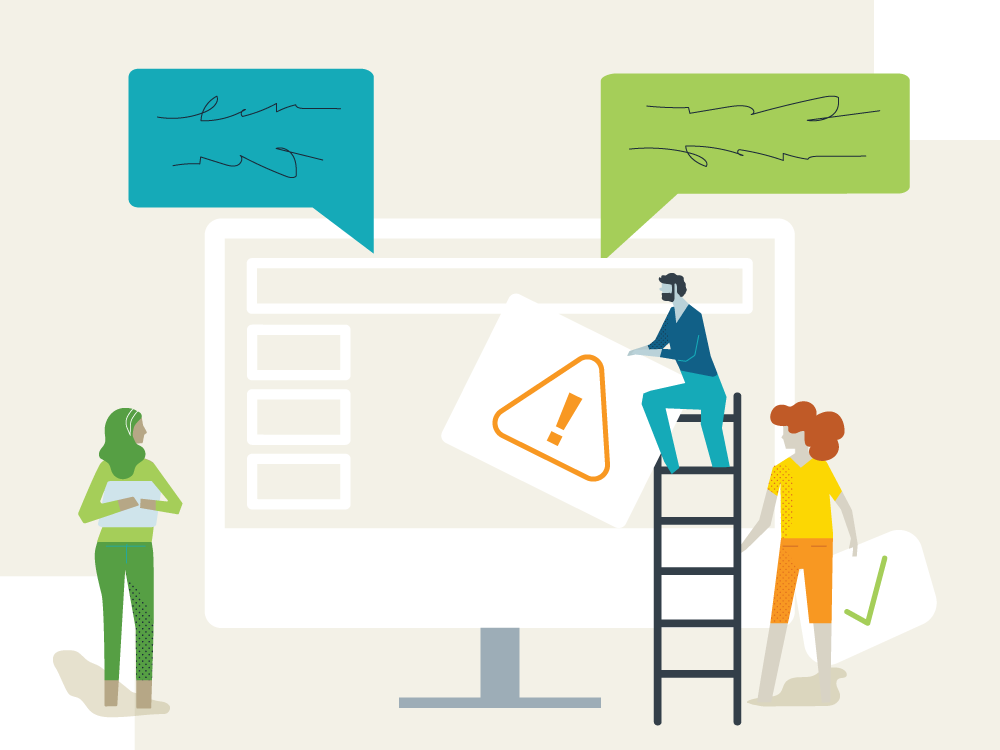
How to Create Annotated Mock-Ups KB

September 17, 2021 By Cristina Villarreal Núñez

How to Create Annotated Mock-Ups KB

Project: Write-up for a new KB
Client: Design & WebDev STA team
Completion Status: Done and published
Staff Guidance: Suloni
STA Team Members: Cristina (t’is I)
Description/Plans: Write a new guide for STAs to reference if working on annotated mock-ups.


I don’t think I had to do that kind of intro for this sort of project… but I haven’t done any of those for my current projects, so I thought I’d give it a go, for practice. Anyway, since I’ve described the premise of this project already, let me tell you why I was assigned to it and how I went about drafting it.


First, I was assigned to this task based on an annotated mock-up I made recently. (You can find it below, on the most recent update on the Texas Beyond History project). So, the steps to go about making something like this were pretty fresh in my mind.


Moving on, I drafted this KB by dividing it into 3 sections: an introduction, a brief list of goals, and the steps to make an annotated mock-up in context. For section 1, I explained why we make stuff like this as STAs, then I defined what mock-ups are in general, and concluded by pointing out why an annotated mock-up is different and important. On section 2, I just listed three goals of the guide, which are to understand the definition, the theoretical & practical applications of these, and how to compliment these with clear client emails. For section 3, I proposed a situation (which is pretty much the same situation I was in when I made the mock-up that started this all), and explained step-by-step how to carry out this task.


Finally, I added two links on trainings for further email and client communication tips, and I made the banner here below for the KB. 


Update: “Here’s the link to the published page: https://sites.la.utexas.edu/kb/2021/09/20/how-to-create-annotated-mock-ups/ Enjoy!” – Cristina (me), September 20th, 2021
Filed Under: Fall 2021 - Spring 2022

Photo IDs

September 17, 2021 By Cristina Villarreal Núñez

Photo IDs

Here are some Photo ID’s I worked on this week…


That’s it… don’t have much to explain; did some color correction work, and contrast adjustments. I think by this point y’all know how these are made…

Filed Under: Fall 2021 - Spring 2022

TBH: Rusk County Map Update Pt.2

September 10, 2021 By Cristina Villarreal Núñez

TBH: Rusk County Map Update Pt.2

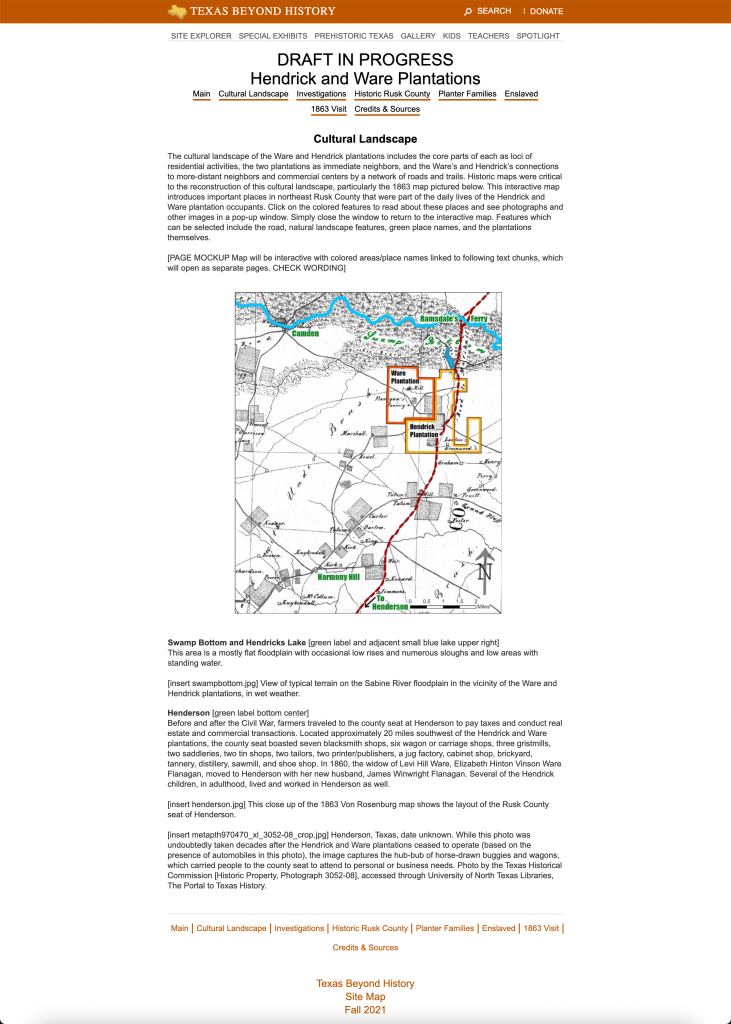
Welcome back to the Texas Beyond History Saga. Today we feature the newest installment in the series; “TBH; Rusk County Map Update Pt.2 – Electric Boogaloo.” As you might remember, the essence of this project is to develop an interactive image through Canvasser for a new Texas Beyond History page.


To recap what I said in the meeting last week but didn’t write in my blog, the map is currently functional as follows: the external links (the ones with the descriptions and images from each of the highlighted locations) now open within the same tab as the map’s page, and the user will have to click on the browser’s back space to return the map or –and I’ll elaborate on this in a bit– click on special buttons on each external site that will take them back to the map’s page. I also made an update to the links on the map. Now, the pages you are taken to when clicking on the hotspots take you to the –now pending– links where the pages will be once they’re done, rather than to the backup draft page.


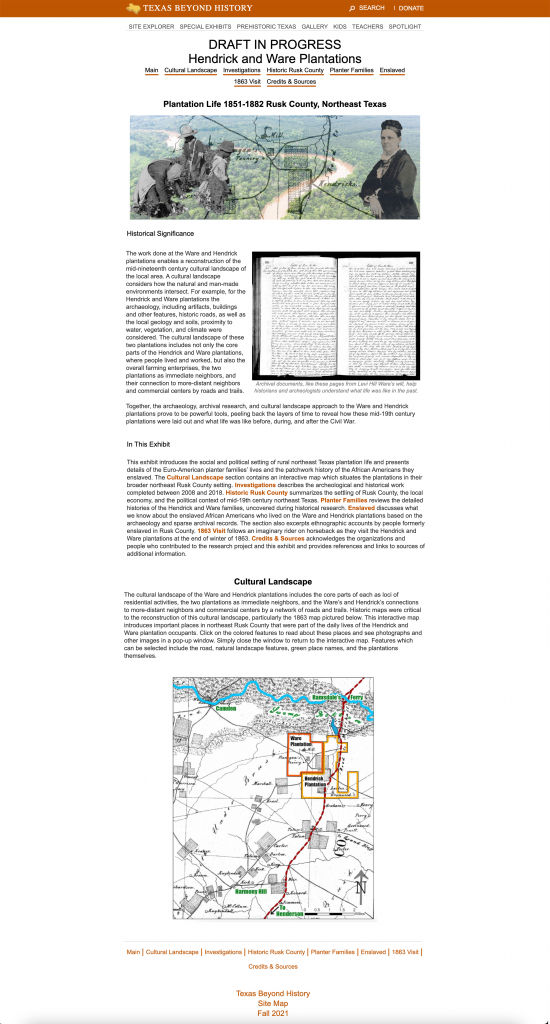
Now that the interactive map itself is pretty much done, the next step is to focus on the web development part of the assignment. Specifically, we have to focus on three different sites. One, the page where the map will be placed after all; two, the draft page where they want us to embed the map now; and three, a sample page (specifically for the Ware Plantation spot) for them to use as a reference to copy/paste the format and rework that into all the other sites they will make. So, given that this is a lot to ask of us without the proper clarifications, as Lauren, from the webdev team helped me build a little something-something for the Ware Plantation site, I worked on some mockups to get the client to tell us specifically what they think.


This image is a visualization of how the interactive map might end up looking when inserted into the official Rusk web exhibit. The purpose of this mockup was to let the client use it use as a reference to know how they might need to work with the layout of the site (text editing and such) once the map is inserted.
. This image represents how the map would look like when we insert it into the draft page. The map in this mockup was placed in that spot to be “preceded by a paragraph above and a paragraph below”, as they requested. Also, the size of the interactive map was decreased in comparison to how it currently looks on the page so that the map would be fully visible on the screen without having to scroll down, to improve the user experience.
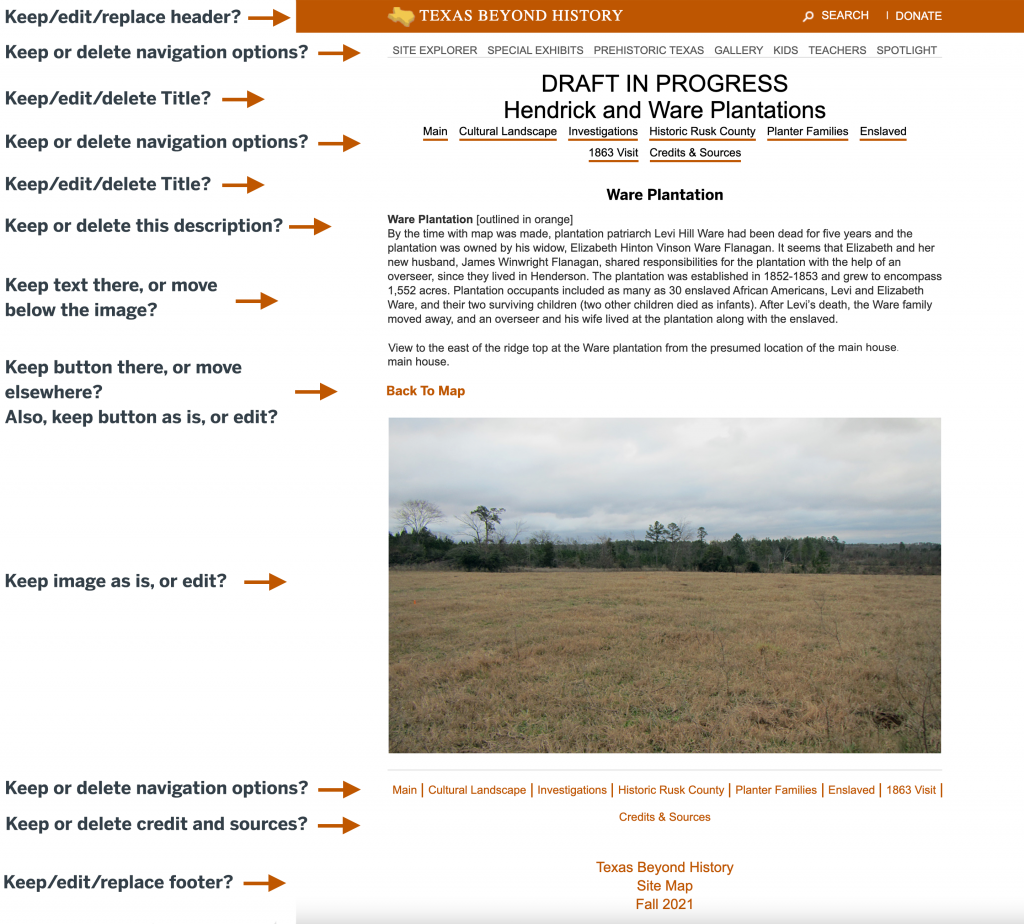
Finally, this is a mockup for the Ware Plantation page and how it could look like. For this mockup we want the client to let us know more explicitly what elements they would like to keep, delete, replace, or edit once these changes are implemented to the site online.

Also, to clarify the vocabulary I used in the third mockup, here is what I mean by that:

Keep: Leaving the element exactly as it is.
Delete: Getting rid of the element altogether.
Replace: Continuing to use the concept of the element (i.e. a header or title) but replacing the format to a different style of your choosing.
Edit: Continuing to use the concept and specific element but making further changes to improve upon it. Make sure to further elaborate on the edits to be made. For example, keeping the image but resizing it, requesting to move the text below the image, removing a specific portion of the text, changing the wording on the titles, etc.


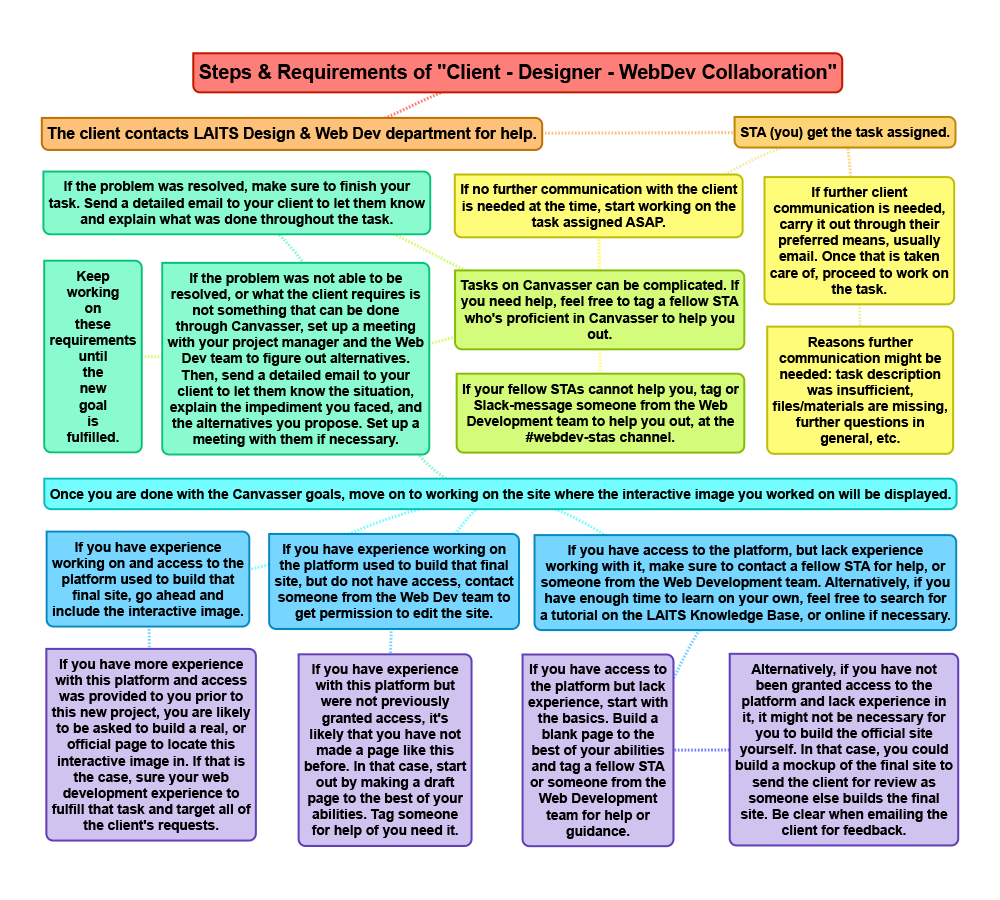
Finally, after sending all of that in an email to the client [response still pending], today I worked on a flowchart of the collaboration process throughout this project. I haven’t had any feedback on that yet, but so far, this is how that looks like:

Filed Under: Fall 2021 - Spring 2022

Miscellaneous Tasks

September 3, 2021 By Cristina Villarreal Núñez

Miscellaneous Tasks

Howdy y’all. This week I didn’t work on many new projects that you don’t already know about. I will be updating you all on those, so keep an eye out for my upcoming posts. But for now, let me talk to you guys about some of the smaller tasks I completed this week.


First off, one of the biggest news of the week is that Tuesday was the last work day of two of our STAs; Athena, who started out at the same time as I did a little over a year ago; and Jake, who has been a core STA since before I joined the program. So, following our good ole farewell tradition we have here at the Design/WebDev STA team, I made two goodbye cards this week. They were really cool too. I made sure to personalize the design a bit, so I made Athena’s tennis related, and Jake’s more tech/game related. I won’t add them to this post because it feels weird to post about what is supposed to be a heartfelt gesture. But just so you know, those were two of the minor tasks I completed this week.


Another miscellaneous task I completed this week was a mandatory UT training, specifically the Information Security Awareness training. Not much to say about that. I just watched the videos, completed the tests, and overall reinforced my knowledge on information security. Which, if you may not know, is the kind of security related to password protection, viruses, email scams, etc.


Finally, I worked on a some blog related stuff. As in, we are holding a Blog Banner Contest to determine the new design for the blog banner. This was not a mandatory assignment, but I had some inspiration over the weekend and some time this week to get it done, so I went for it. I also tested them with the old STA caricatures and they both looked neat. I’m not even thinking about the contest to be honest, I’m just happy I designed a cool looking retro banner, hehe.


Here are the two designs I proposed:


Nevermind… It’s a secret 👀


Oh, I also worked on editing my blog caricature too, but it’s not worth uploading. I just made my hair longer, but it’s the same design, hehe.

Filed Under: Fall 2021 - Spring 2022

Draft Web Service Page In Cascade Update

August 31, 2021 By Cristina Villarreal Núñez

Draft Web Service Page In Cascade Update

Daaang Daniel, back at it again with the Web Service Page… (sorry and you are welcome for the old Vine reference)…


Anyway, on todays news, we have a new update on the Draft Web Service Page situation. In brief, last time I was working on a few different banner options for Suloni to look at, but they were a but too out of the box for what the project requires. So, not long ago, I resumed my work on this project and got down to business on a new banner following Suloni’s feedback into this new direction.


Long story short, this is what the banner looks like now! I’m also excited because I got to work with UT’s official illustrations and even got to alter them a bit to fit the purpose of the banner.


After I got approval for that, I was assigned the followup task to work on three more things (for now, at least).

1. Design a new illustration (still using the official UT illustrations) to include within the content of the page.

2. Mockup the Web Service Page on my own STA Cascade site.

3. Draft the content of the page to reflect the services that will be offered through it and/or to redirect them to the right assistance provider.


So, without further a do, you can find all those cool things in the following link: https://liberalarts.utexas.edu/sta-12/draft-web-service-page/, enjoy! I will also include the content body illustration I designed for the page bellow. I’m proud of it…


I think we are still waiting on suggestions and ideas for next steps from the web development team, so final update coming soon to a theater near you. 👍

Filed Under: Fall 2021 - Spring 2022

TBH: Rusk County Map Update

August 31, 2021 By Cristina Villarreal Núñez

TBH: Rusk County Map Update

Welcome back to another installment of Texas Beyond History: A Rusk Country Map Story, ft. special guest Canvasser… So, as you might remember from a few posts ago, I was tasked to develop an interactive image through Canvasser for a new Texas Beyond History page. The image in questions is meant to be a map (black 7 white) with colored-in spots to let the user know that those are the interactive spots. Once the user clicks on them, a new page [for every element] will open up on a new tab of the user’s browser with pictures and information about each of the special locations.


Since last time, we have gone through a bunch of different updates on the project. After I had my initial conversation with the client I started working on the map on Canvasser. That is, until I stumbled upon the first obstacle: what Canvasser feature would be the most appropriate to use for these click elements? I was lucky enough to get some feedback from a fellow STA on that… but then came the second obstacle: who was going to make the external links (the ones that will pop open on a new tab after clicking on the map locations)? And if that were to be me, how would I do that? That question right there sparked a whole new phase in the development of this project. This new era being defined by various meetings, not only with myself and Suloni, but with the web development team. After the initial meeting with this new team, we came to a few conclusions and some new questions for the client. So, I drafted a new email and sent it over his way.


Over the weekend the client responded to my email. As soon as I started my shift on Monday, I let the rest of the team know of his response. At this point we were not sure Canvasser would be able to carryout the needs of the project, and we were thinking of finding an alternative program to build the map with, but the client’s response made it very clear that we would need to use Canvasser. So I got back to business using the method my fellow STA had suggested earlier, which was the loadpage feature. I also got a suggestion by someone else in the team, but sadly that feature of Canvasser is not working properly.


Moving on with loadpage, I was able to get far with the map’s interactive elements. But a problem remains: due to a security measure implemented by different browsers, the feature that lets a new tab pop open requires that the user clicks on a security text first. Needless to say, that’s not ideal. So, the project phase we are currently at is finding workarounds to this inconvenience.


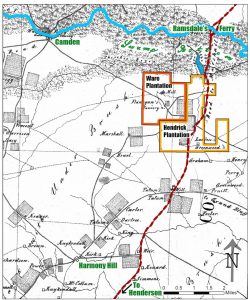
You can see the current Canvasser Interactive by clicking on the map to the right, or right here. As of right now, most of the clickable elements are working the loadpage feature and dealing with the additional clickable text issue. There are only three exceptions. First, the of you click on the Camden text, a new button will pop up. I was trying to work around the issue previously mentioned, but I accidentally ended up adding an extra step with the button; so that was a fail. Second, the hotspot on the Hendrick Plantation works just as the rest, except that the background color that appears with the security text is orange, rather than transparent. Finally, Ware Plantation is working smoothly through an alternative loadpage event that activates new pages opening up on the same tab rather than a new one. Feel free to put all of these to the test! (Bear in mind that changes will be coming soon, so those actions won’t last forever.)

Filed Under: Fall 2021 - Spring 2022

  • « Previous Page
  • 1
  • …
  • 4
  • 5
  • 6
  • 7
  • 8
  • …
  • 17
  • Next Page »

link to LAITS home page

Video STA Home

© 2025 Liberal Arts Instructional Technology Services | Production Credits