• We are STAs
    • Asha Rountree
    • Haley Ma
    • Kate Shih
    • Kyra Lee
    • Nicholas Peasley
    • Sasha Kenney
    • Shanda Horm
    • Shriya Atreya
    • Tomas Marulanda-Mesa
  • We were STAs
  • STA Presentation
    • STA Presentation 2017
    • STA Presentation 2016
  • Testimonials
  • Resources
  • Home

STA Blog

Sheryl Long 2020 Orientation

January 17, 2020 By Sheryl Long

Hi Sheryl!

During the later part of your STA Orientation Tuesday, January 21st,
you’ll design and upload your STA Blog banner to the STA blog.

Upload a Blog Banner


Step One:

Design and Make Your Banner in Photoshop

  • Use the Photoshop specs for your blog banner that I placed in your STA volume folder
    • Left-click on the home screen,
    • the press command + k to connect to server
    • smb://file.laits.utexas.edu/sta/Sheryl Long/Orientation
  • Save your unmerged files back to your STA volume folder

Step Two:

Log-in to the STA word press blog:

https://sta.laits.utexas.edu/wp-admin

Uploading media and banners in WP

  • Read these links before you upload your banner.
  • They will walk you through how to upload media to your blog.

https://sta.laits.utexas.edu/wp-admin/admin.php?page=wp-help-documents&document=115

https://sta.laits.utexas.edu/wp-admin/admin.php?page=wp-help-documents&document=18881

Make Your First Blog post


  • Reflect on the day. You blog posts will be a documented experience of your time as an STA with LAITS. Include links, images, gifs–anything you want to share about the projects you’re working on.
  • For today, write a bit about about yourself and what you did during orientation.
  • If you haven’t already, upload your banner.

Things to Remember


Image Specs.

  • You should never copy and paste images to your blog. Always upload images into the “Media” section of blog first, and then insert the image from the media folder to display on your blog.
  • Don’t use the thumbnail version of your images.
  • Use images that are 72 dpi
  • Screen shots are fine
  • Images that are 780 pix wide format nicely above or below text blocks

Always Categorize Your Posts

  • Always check the category “2019 Fall-Winter | Spring-Summer 2020” for all the blog posts you make this semester and next semester so that all of your work is documented in the correct semesters.

Commenting on Basecamp

Notification comments: etiquette, files, questions, feedback

Let us know when you’ve completed this task by adding a link to your blog to a comment on Basecamp.
Notes for all comments in Basecamp:
  • *Always address the person(s) you are writing to by their names.
  • *Always use complete sentences.
  • *Always add links or paths to your design file residing in your STA folder
  • *make things easier for your collaborators and mentors by adding a screenshots of the file you are asking for feedback on to your comment
Notify people in Basecamp by adding “@” before their names (no spaces), otherwise they may not see your comment.

“@” your STA mentor and Suloni in your comments when you want to:

  • ask us questions you may have about the mechanics of using the STA blog,
  • about the mechanics of photoshop,
  • to let us know that you have completed this task,
  • or that you would like a little feedback on on your banner design 🙂
Thank you & have fun!

Filed Under: 2019 Fall-Winter | Spring-Summer 2020, Uncategorized

Ishan Kamat 2020 Orientation

January 17, 2020 By Ishan Kamat

Hi Ishan!

During the later part of your STA Orientation Tuesday, January 21st,
you’ll design and upload your STA Blog banner to the STA blog.

Upload a Blog Banner


Step One:

Design and Make Your Banner in Photoshop

  • Use the Photoshop specs for your blog banner that I placed in your STA volume folder
    • Left-click on the home screen,
    • the press command + k to connect to server
    • smb://file.laits.utexas.edu/sta/Ishan Kamat/Orientation
  • Save your unmerged files back to your STA volume folder

Step Two:

Log-in to the STA word press blog:

https://sta.laits.utexas.edu/wp-admin

Uploading media and banners in WP

  • Read these links before you upload your banner.
  • They will walk you through how to upload media to your blog.

https://sta.laits.utexas.edu/wp-admin/admin.php?page=wp-help-documents&document=115

https://sta.laits.utexas.edu/wp-admin/admin.php?page=wp-help-documents&document=18881

Make Your First Blog post


  • Reflect on the day. You blog posts will be a documented experience of your time as an STA with LAITS. Include links, images, gifs–anything you want to share about the projects you’re working on.
  • For today, write a bit about about yourself and what you did during orientation.
  • If you haven’t already, upload your banner.

Things to Remember


Image Specs.

  • You should never copy and paste images to your blog. Always upload images into the “Media” section of blog first, and then insert the image from the media folder to display on your blog.
  • Don’t use the thumbnail version of your images.
  • Use images that are 72 dpi
  • Screen shots are fine
  • Images that are 780 pix wide format nicely above or below text blocks

Always Categorize Your Posts

  • Always check the category “2019 Fall-Winter | Spring-Summer 2020” for all the blog posts you make this semester and next semester so that all of your work is documented in the correct semesters.

Commenting on Basecamp

Notification comments: etiquette, files, questions, feedback

Let us know when you’ve completed this task by adding a link to your blog to a comment in Basecamp.
Notes for all comments in Basecamp:
  • *Always address the person(s) you are writing to by their names.
  • *Always use complete sentences.
  • *Always add links or paths to your design file residing in your STA folder
  • *make things easier for your collaborators and mentors by adding a screenshots of the file you are asking for feedback on to your comment
Notify people in Basecamp by adding “@” before their names (no spaces), otherwise they may not see your comment.

“@” your STA mentor and Suloni in your comments when you want to:

  • ask us questions you may have about the mechanics of using the STA blog,
  • about the mechanics of photoshop,
  • to let us know that you have completed this task,
  • or that you would like a little feedback on on your banner design 🙂
Thank you & have fun!


Filed Under: 2019 Fall-Winter | Spring-Summer 2020

1-17-20

January 17, 2020 By Bridget

I’m at the end of my 2nd week back as an STA after a few months off, and it’s been an adjustment getting in the habit of waking up early again, but I’m glad to be back!

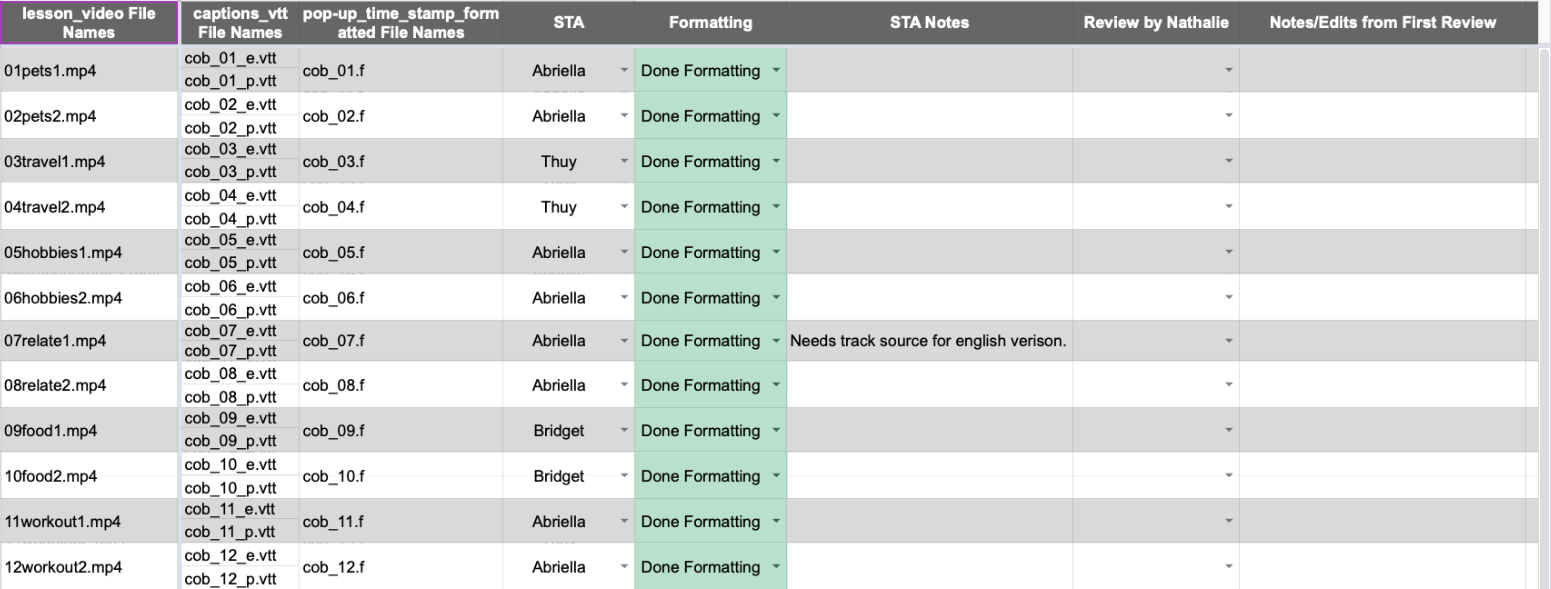
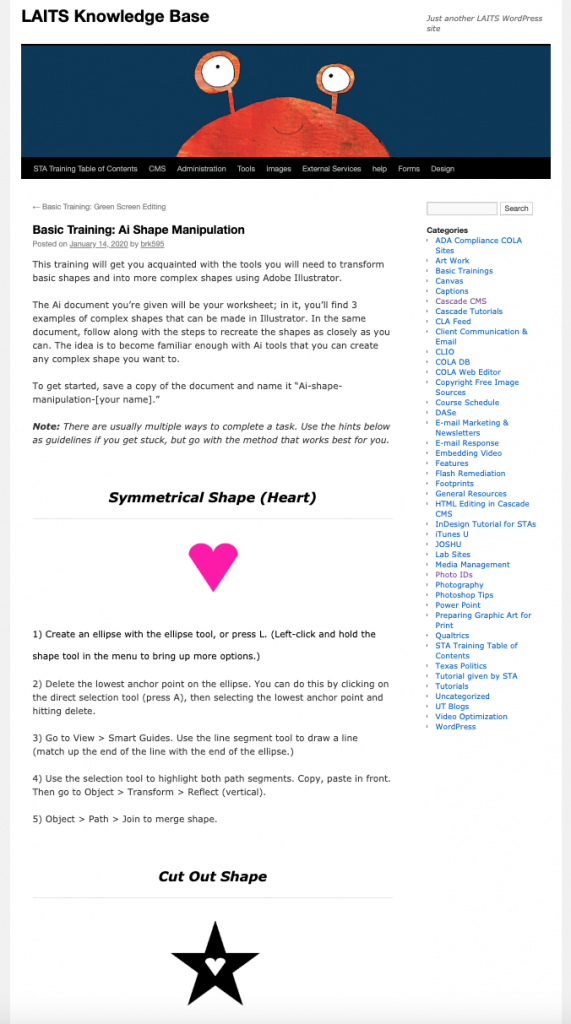
I don’t have a whole lot to report. My first week back we were finishing a video remediation project, which involved adding captions to Portuguese-language videos that had been updated from Flash. Since then I’ve been doing photo IDs, adding some basic training guides to the Knowledge Base (here’s the page I updated), and helping to get permissions set up for new STAs so they can use Cascade/the Web Editor/this blog.

My KB blog post:

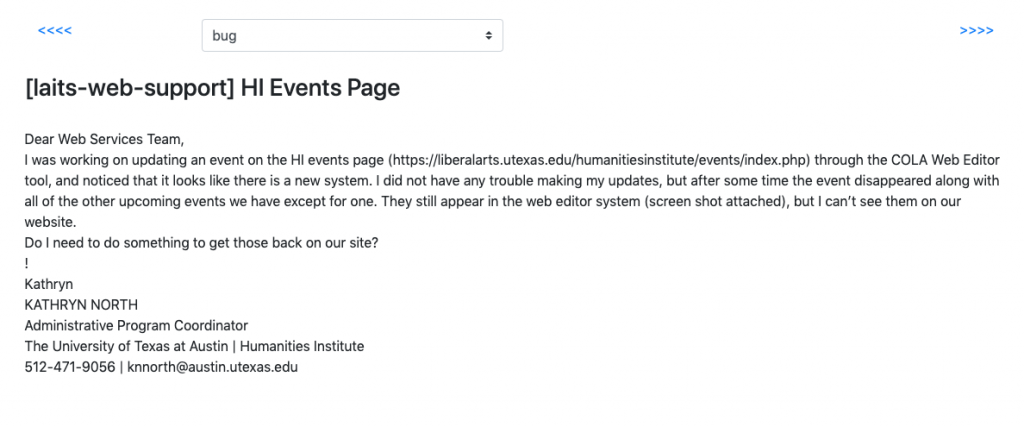
Also, a few of us who are familiar with Cascade/COLA Web Editor are starting to work on web support requests from clients. We’re meeting with the creator of the Web Editor chat box sidebar to find a method of going through archived and incoming emails so we can get a sense of the types of problems faculty and staff frequently run into. After we go through an email, we’ll figure out if there’s existing documentation to cover the problem, and if so add a link in the chat box, or if we need to create new documentation.

The goal with this project is to anticipate as many COLA Web Editor/Cascade issues as possible to make it easier for staff and faculty. Here’s what the interface for sorting the emails looks like:

The main difficulty with this project is probably going to be parsing the emails to find the root issue, and finding the best, most succinct way to address it with documentation, but I’ll add updates when we get further along with this.

Filed Under: 2019 Fall-Winter | Spring-Summer 2020

New Project

January 13, 2020 By Rodrigo Villarreal

Project: Ancient Currencies
Client /Prof:  Adam T Rabinowitz and Giuseppe C Castellano
Completion status: Started January 13th 2020
Staff guidance: Stacy Vlasits
STA team members:
Description/plans: Create a working prototype for a currency converter between coins of ancient civilizations
To be completed: A couple of weeks

Filed Under: 2019 Fall-Winter | Spring-Summer 2020

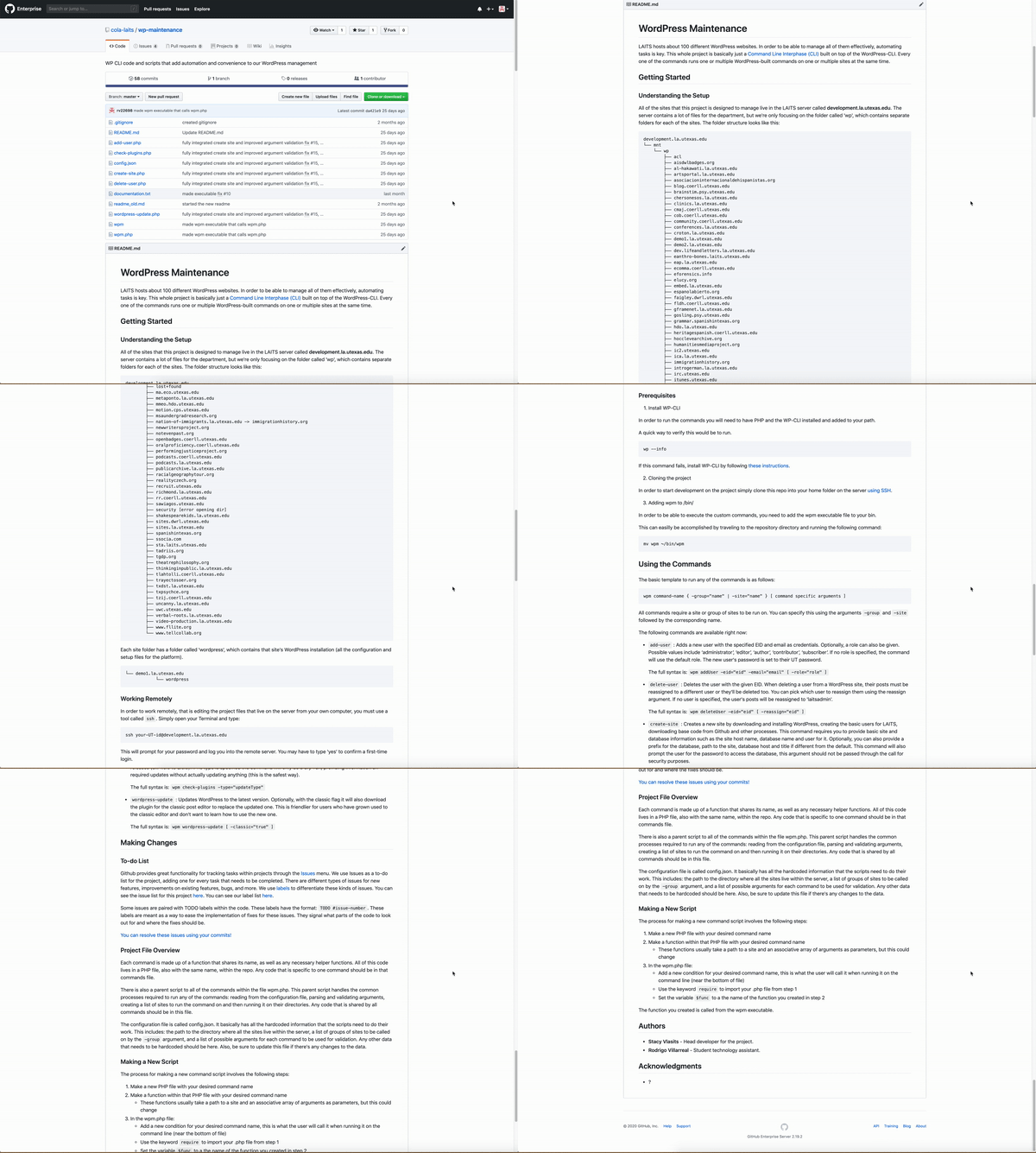
WordPress Maintenance Finished

January 13, 2020 By Rodrigo Villarreal

WordPress Maintenance Finished!

I’m writing this on my first shift after Christmas break. (First post of the decade!)

Before talking about what I’ll be doing this coming semester I wanted to post about the WPM project one more time. I spent all my shifts before leaving for the break working on the documentation and finishing up some small issues. Basically, making the project ready for whoever takes over in the future. I honestly think the Github repo looks great, it has a lot of information that I wish I knew before I started this project. I also closed all the technical and documentation issues, only 4 ‘enhancements’ need to be done.


Filed Under: 2019 Fall-Winter | Spring-Summer 2020

COERLL

January 9, 2020 By Abriella Corker

CONVERSA BRASILEIRA

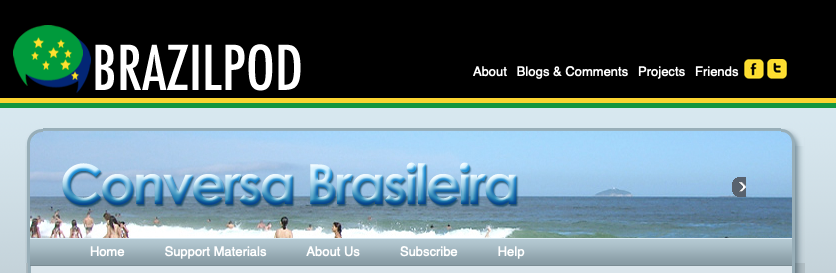
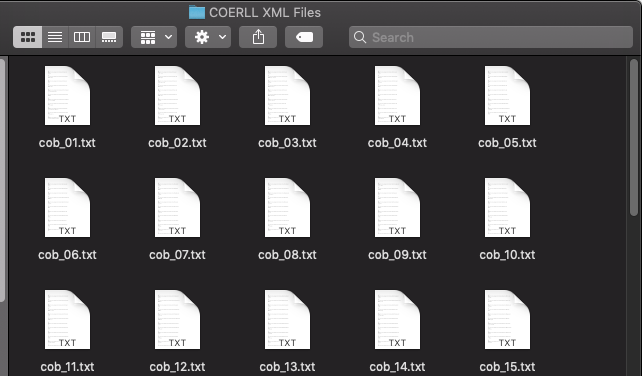
Thuy, Bridget, and I have been working on transferring these Portuguese practice videos to WordPress. We upload the videos, add captioning, and then include popup for vocabulary. It is a pretty repetitive process but we are able to go through them quickly. They might be done by the end of this week.


Filed Under: 2019 Fall-Winter | Spring-Summer 2020

  • « Previous Page
  • 1
  • …
  • 56
  • 57
  • 58
  • 59
  • 60
  • …
  • 80
  • Next Page »

link to LAITS home page

Video STA Home

© 2025 Liberal Arts Instructional Technology Services | Production Credits